
Why iPaaS Powers Modern Automation
The Backbone of Modern Business Automation
Reading Time: 10 min

Overview
Not long ago, getting two software systems to share data required a developer, weeks of work, and a budget that made everyone nervous. Today, the same outcome take hours. That shift has a name: iPaas or AI automation. Here's what it is, why it matters, and where it falls short.
IN THIS ARTICLE
• What is iPaaS?
• How integration used to work and why it broke
• What modern iPaaS actually changed
• Why every SMB needs an integration strategy
• Where to start your automation journey
• When iPaaS isn’t enough and what comes next
• Introducing Loop by WorkLoopie
• Final thoughts
What Is iPaaS?
Definition
Integration Platform as a Service (iPaaS) is a cloud-based middleware layer that connects applications, systems, and data sources — enabling automated data flow and workflow execution across your technology stack without requiring custom-coded integrations for every connection.
In practical terms: your CRM, marketing platform, accounting software, and support tools all hold data that should be synchronized. iPaaS is the layer that makes that synchronization happen automatically, without your team manually exporting, copying, and re-entering the same information across multiple systems.
The term “middleware” has been around for decades, but iPaaS represents a fundamentally different approach, one built for the cloud, accessible without an enterprise IT team, and priced for businesses of all sizes.
How Integration Used to Work and Why It Broke
Before iPaaS, connecting two business systems was a genuine engineering project. Every integration was handcrafted: developers wrote custom code to move data between applications, and that code had to be maintained, updated, and debugged every time either application changed its API.
For larger organizations, Enterprise Service Buses (ESBs) handled this, but they were expensive to implement, brittle to maintain, and required dedicated IT teams just to keep them running. For SMBs, robust integration simply wasn’t accessible.
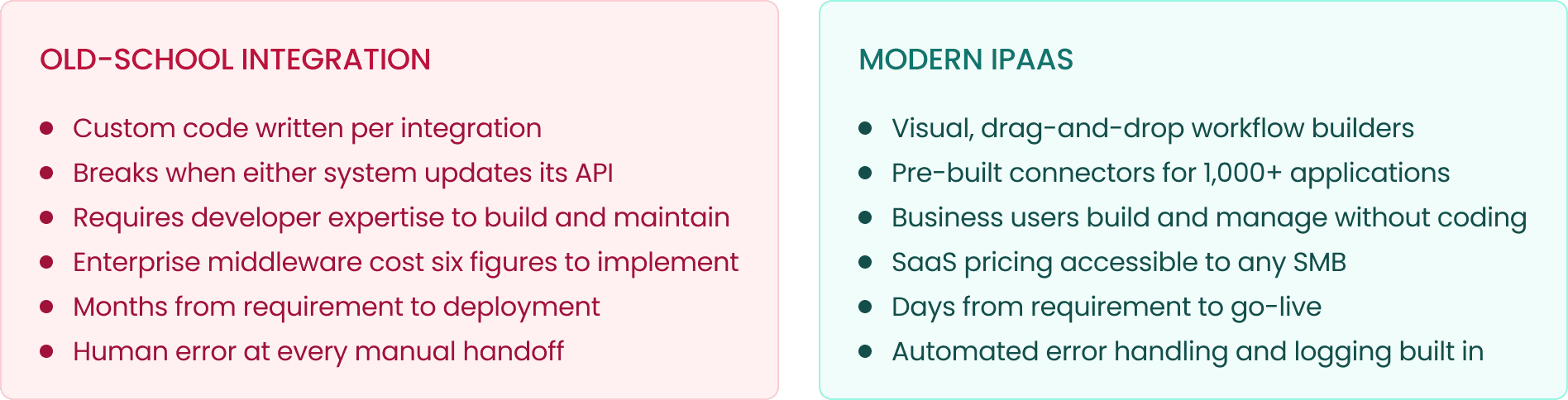
The shift wasn’t just technical, it was organizational. iPaaS moved integration from an IT project into the hands of operations, marketing, and RevOps teams. The people who understand the workflows best can now build the automations that support them.
What Modern iPaaS Actually Changed
The practical impact of iPaaS shows up in three categories: data, speed, and cost.
Eliminating data silos
Most SMBs don’t have a data problem, they have a data location problem. The information exists, but it’s scattered across systems that don’t talk to each other. A lead comes in through a marketing form, sits in the CRM, while the sales team’s activity lives in a spreadsheet, and the billing system has no idea what either of them is doing. iPaaS connects those systems at the data layer, creating a coherent view across the organization.
Accelerating digital transformation
Manual processes are the most common growth bottleneck we see at WorkLoopie. Not because teams are inefficient, but because the tools that should automate those processes aren’t connected. iPaaS removes that bottleneck; your team takes on more, error rates drop, and the work that was consuming hours becomes invisible background infrastructure.
Reducing integration costs
Cost Comparison
Traditional enterprise middleware implementations routinely cost $100,000–$500,000 in setup alone. Modern iPaaS platforms start at a few hundred dollars per month with no implementation overhead. The same data connectivity that was once exclusive to enterprise companies is now table stakes for a $2M ARR startup.
iPaaS also reduces ongoing maintenance costs — pre-built connectors are maintained by the platform vendor, not your team. When Salesforce updates its API, you don’t need a developer emergency. The connector updates automatically.
Why Every SMB Needs an Integration Strategy
The average SMB now runs between 8 and 15 SaaS applications. Each of those tools captures data about your customers, your pipeline, or your operations. Without an integration strategy, that data stays siloed — and siloed data means siloed decisions.
Real-time data synchronization — your CRM, ERP, and analytics tools reflect the same reality at the same time, eliminating the ‘which number is right?’ conversation from every leadership meeting
Automated repetitive tasks — lead routing, onboarding provisioning, invoice processing, status updates — the workflows that should happen automatically, actually happen automatically
Compliance and governance — iPaaS platforms support HIPAA, GDPR, and SOC 2 requirements through centralized data handling and audit logging
Scalability without headcount — connected systems let your existing team handle more volume without proportional hiring
Where to Start Your AI Automation Journey
The most common mistake is trying to automate everything at once. The right approach is sequential — start with the workflow that causes the most friction, build the automation, measure the impact, and expand from there.
Assess your current stack and pain points. Identify where your team manually moves data between systems more than once a week. Those are your highest-ROI automation candidates.
Start with one high-impact process. Form-to-CRM sync and client onboarding are consistently the highest-value first automations. They’re contained, measurable, and immediately visible to the business.
Choose the right tool for the complexity. Zapier handles simple trigger-action flows well. Make handles moderate complexity with better logic support. For complex branching, data transformations, and multi-system logic, you’ll need something built specifically for that.
Adopt a phased approach. Begin with no-code for simple flows, move to low- code as complexity grows. Don’t try to solve everything in a single build — the best automation stacks are layered over time.
Measure what changes. Track time saved per week, error rates before and after, and cost per process. Automation ROI is almost always faster than expected — but you need the baseline to see it clearly.
When iPaaS Isn’t Enough and What Comes Next
Standard iPaaS platforms are built for the common case: a trigger fires, data moves from point A to point B, maybe a condition or two along the way. For the vast majority of business workflows, that’s exactly what’s needed.
But every operations team eventually hits a wall. The moment your business logic becomes too complex, too branchy, or too data-heavy for a visual builder to handle cleanly, that’s when the standard approach starts breaking down. Teams end up paying for expensive enterprise upgrades just to unlock basic conditional logic, duct-taping multiple automations together in ways that are brittle and hard to maintain, or bringing in developers to babysit workarounds that shouldn’t require development resources.
The iPaaS Ceiling Example
Zapier needs 4 separate Zaps, multiple premium features, and still cannot handle native error retry logic for a single complex order routing workflow. Make handles more complexity, but costs escalate quickly at scale. Neither platform was designed for deeply nested decision chains, custom data transformations, or advanced API behaviors at a predictable cost.
This is a structural limitation, not a configuration problem. Visual drag-and-drop builders optimize for accessibility and breadth of connectors. They’re not optimized for complex logic or mission-critical reliability at scale. When you need those things, you need a different layer in your stack.
Introducing Loop by WorkLoopie
Loop by WorkLoopie. Now in early access.
Loop is the automation layer built for exactly what standard iPaaS can’t handle. It sits alongside your existing Zapier, Make, or n8n stack; you keep simple workflows exactly as they are, and handles the complex logic those tools struggle with: deeply nested decision chains, custom data transformations, advanced API behaviors, and true set-it-and-forget-it reliability.
The key difference is pricing model. Standard iPaaS charges per task execution, which means costs spike as automation volume grows and you end up paying enterprise rates for workflows that don’t need enterprise infrastructure. Loop runs on flat-rate pricing by scenario count: unlimited executions, predictable monthly cost, no surprises.
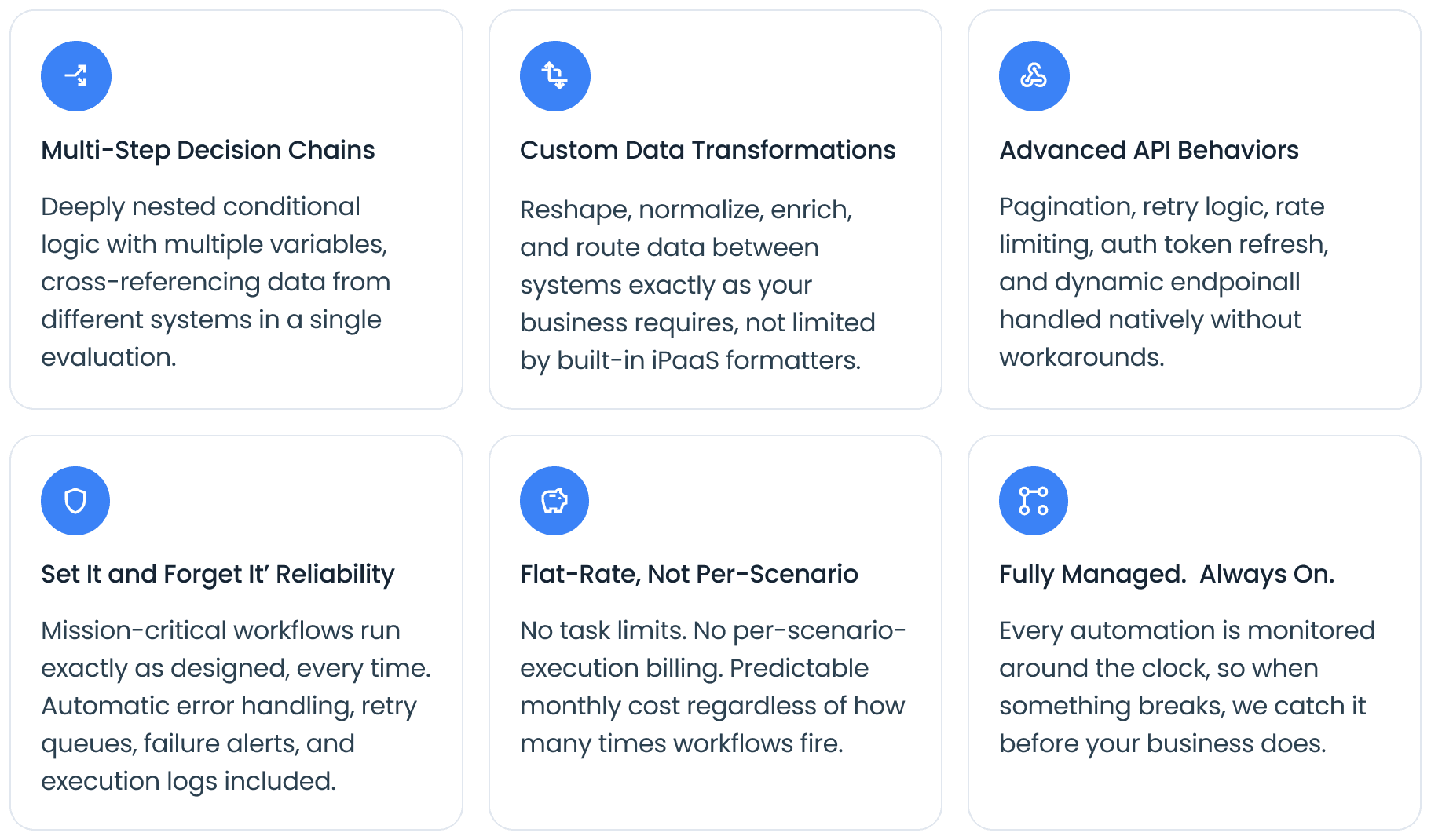
How Loop fits into your existing stack
Loop plugs into your existing Zapier, Make, and n8n workflows via webhook or API. There’s no migration of simple flows required; your stack stays exactly as it is. The most common pattern is to move complex, high-volume scenarios to Loop, then downgrade your iPaaS plan since you no longer need the enterprise tier. The net result is lower total spend and more capable workflows.
Average Client Outcome
60% reduction in monthly automation costs when offloading complex logic to Loop from an enterprise iPaas tier. Simple Zapier and Make workflows stay exactly where they are.
Final Thoughts
iPaaS changed what’s possible for business automation. It took integration from a six-figure engineering project and made it accessible to any operations team willing to invest the time to map their workflows. That’s a genuine structural shift, and it’s still underused by most SMBs.
The starting point is always the same: identify where your team manually moves data between two systems more than once a week. That’s the automation. Build it, measure the time saved, and use that momentum to find the next one. The compounding effect of connected systems, where each integration makes the next one easier, is where the real leverage lives.
For straightforward flows, Zapier and Make remain excellent tools. For the workflows that outgrow them: the complex logic, the multi-system decision chains, the mission-critical processes that need to run exactly right every time, that’s where Loop was built to step in. Not as a replacement for your existing stack, but as the layer it was always missing.
If your business is spending time on work that should happen automatically, or if you’re hitting the ceiling on what your current automation tools can handle, workloopie.com is where to start.