
CUSTOMER STORY
Fitness Coaching Business Cuts Onboarding Time 60% with Automation
How Those Fitness Chicks cut client onboarding time by 60%, elevated the new client experience, and set the stage for even faster onboarding with a second round of automation
INDUSTRY
Fitness Coaching
TIMELINE
3 weeks
SOLUTION
Client onboarding automation
RESULT
20 min → 8 min onboarding

Executive Summary
Shay Swire, founder of Those Fitness Chicks, was spending 15 to 20 minutes onboarding every new client, manually entering the same data into multiple platforms, one field at a time. For a fitness coach whose value is in the coaching, not the admin, that’s time that shouldn’t exist. And copy and paste should not be a career skill.
The problem wasn’t a lack of systems. Shay was already using GoHighLevel for client management and Trainerize for training delivery. The problem was that none of those systems talked to each other. Every new client meant duplicate entry across two platforms, a slow experience for the client, and a growing administrative burden on Shay.
WorkLoopie approached this from the top of the funnel, removing friction at the very first touchpoint. We replaced manual intake forms with a streamlined Google Form that clients can access instantly by scanning a QR code from their phones. Once a client submits their information through the form, Shay can seamlessly continue the consultation using that data.
If the client decides to enroll, Shay simply updates their status within the Google Form to “Onboard.” This action automatically pushes the client’s information into both GoHighLevel and Trainerize. No manual entry, no duplication, no delays!
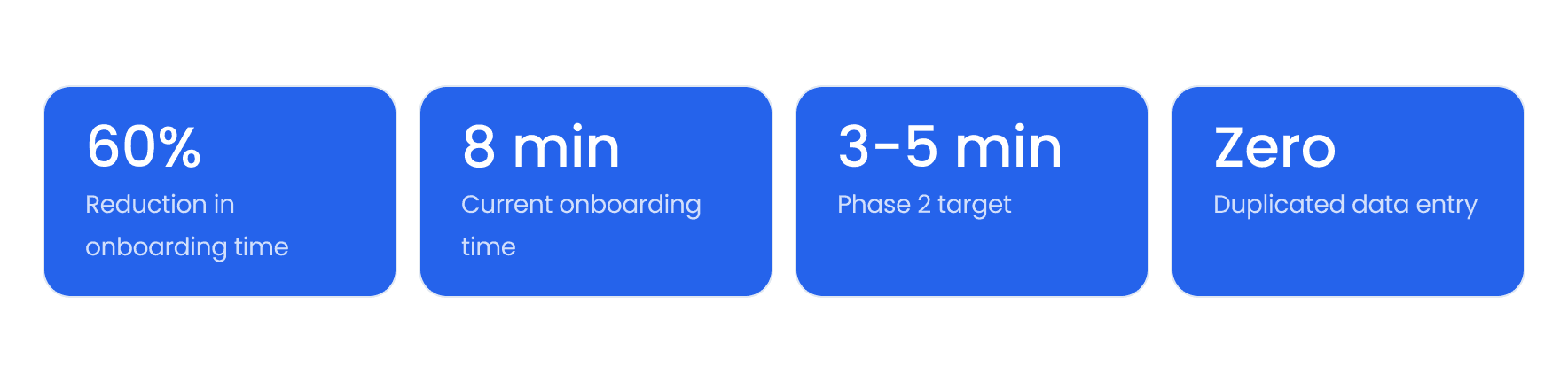
This structure not only reduced onboarding time from 15–20 minutes down to just 8 minutes, but also laid the foundation for future marketing initiatives, including automated drip campaigns. Shay is already planning Phase 2, with a goal of bringing onboarding time down even further to just 3–5 minutes.
The Challenge
Those Fitness Chicks operates with a lean team and a high-touch client model. Every minute Shay spends on administrative data entry is a minute she’s not coaching, not growing her business, and not doing the work that actually matters.
“Working with WorkLoopie has been a game changer for how I onboard new clients. They have helped to automate the process and cut my onboarding time from 15–20 minutes down to 8 minutes. This helps take up less of a new client’s time and enhances the overall experience for them as well.”
— Shay, Founder — Those Fitness Chicks
The onboarding workflow required Shay to touch the same client data in multiple places every single time. A client would fill out intake information, and Shay would then manually enter that data into GoHighLevel to set up billing and communication, and separately into Trainerize to provision the client’s training environment. Two platforms. Same data. Entered twice. Every. Single. Time.
At 15 to 20 minutes per client, the cost wasn’t just time it was the new client experience. A slow, admin-heavy onboarding is the first impression a client gets of how your business operates. Shay knew it could be better.
The Core Problem
Client intake was fully manual, relying on paper-and-pencil forms during consultations.
After each session, Shay had to re-enter client information into both GoHighLevel and Trainerize, creating a disconnected and time-consuming workflow.
Every new client triggered a repetitive, multi-step administrative process, adding friction and increasing the risk of errors.
Onboarding took 15–20 minutes per client, with no automation, no validation, and no scalability. Instead of enhancing the client experience, the back-end process slowed it down significantly.
The Technical Complexity
The challenge looked simple on the surface, move data from a form into two platforms. But getting it right required careful decisions about when data flows, how it’s validated, and what happens when a record already exists.
Three systems needed to work in concert: Google Sheets as the operational data layer, GoHighLevel as the marketing, billing and communications platform, and Trainerize as the training delivery platform. Each had its own data structure, its own field mapping requirements, and its own expectations about what a complete client record looks like.
The trigger design was particularly important. A naive automation fires on every new row, which creates problems when intake forms are partially completed, updated mid-process, or submitted before Shay has reviewed them.
WorkLoopie built the automation to trigger on changes to a dedicated STATUS column instead. Shay controls exactly when a record flows downstream, giving her a built-in review gate without adding any manual steps to the process.
Key Technical Considerations
Google Sheets as the data layer: form responses feed directly into TFC’s own Google Drive, keeping data ownership with Shay
STATUS column trigger: automation fires on new or updated status values, not blindly on every form submission
Insert vs. update logic: the Zap handles both new records and updates to existing records, preventing duplicate client profiles
Parallel writes: GoHighLevel and Trainerize are updated in the same automation run, not sequentially, minimizing lag
Field mapping: each platform uses different field structures — the automation normalizes the data correctly for each destination
The Solution
WorkLoopie built a lightweight, maintainable automation that connected Shay’s existing tools without requiring her to change how she works or adopt new platforms.
Google Form → Google Sheet
The client intake form was built in Google Forms and configured to feed responses directly into a Google Sheet hosted in Those Fitness Chicks’ own Google Drive. Shay retains full ownership of her client data, it lives in her account, not a third-party system. The sheet serves as the operational hub: every new submission creates a row, and a dedicated STATUS column gives Shay a single field to control when a client record moves forward. It also sets her up for future automations such as marketing campaigns.
Status-Triggered Zap
A Zapier automation monitors the Google Sheet for new or updated values in the STATUS column. When Shay changes the status to "ONBOARD", the Zap fires — pulling all relevant client data from that row and routing it to both downstream platforms simultaneously. The trigger design gives Shay a natural review point without creating any additional manual work. She sets the status. Everything else is automatic.
GoHighLevel Integration
The Zap creates or updates a contact record in GoHighLevel, mapping all intake fields to the appropriate custom fields and groups configured for Those Fitness Chicks. New clients are automatically added to the correct pipeline stage and tagged for onboarding sequences. Returning clients or updated records are updated rather than duplicated, keeping the CRM clean.
Trainerize Integration
Simultaneously, the Zap provisions the client’s profile in Trainerize. The platform Shay uses to deliver training programs. The client’s information is inserted directly, removing the manual step that previously required Shay to switch platforms, find the new client form, and re-enter data she had already collected.
Complete Solution Architecture
Google Form → Captures all client intake data
Google Sheet → Central data hub with STATUS control column
STATUS = "Onboard" → Triggers automation
Zapier → Detects change and runs workflow
GoHighLevel + Trainerize → Client records created/updated simultaneously
Insert/Update Logic → No duplicates, fully synced data
Key Design Decisions
Work With Shay’s Existing Tools, Not Around Them. Rather than introducing a new intake platform, WorkLoopie built the automation around Google Forms and Google Sheets tools Shay was already using. Her workflow didn’t change. The automation simply made it faster.
STATUS Column as the Control Gate. Triggering on a status field rather than on form submission gives Shay a built-in review step without adding friction. She can collect intake data, review it, and release it downstream when she’s ready, in a single field update.
Parallel Platform Updates. GoHighLevel and Trainerize are updated in the same automation run, not in sequence. This eliminates lag between the two platforms and ensures that from the moment a record is released, Shay has a complete,synchronized client profile across her entire stack.
Built for Phase 2 from Day One. The architecture was designed to be extensible. Adding new fields, connecting additional platforms, or introducing more complex logic in a future phase requires minimal rework. The foundation supports what’s next.
The Results
The impact was immediate. From the first client onboarded through the new system, the manual multi-platform entry process was gone. What had taken 15 to 20 minutes now takes 8. And the improvement wasn’t just for Shay, it was for every client walking through the door. The time allowed her to develop new programs for her clients, and expand into online training.
“WorkLoopie’s team has been intentional and thoughtful. They listen, ask questions, and really make you feel confident in their approach and their commitment to understanding your business bottlenecks. Nothing feels cookie cutter but built to support your business needs and how you operate.”
— Shay, Founder — Those Fitness Chicks
Beyond the time savings, Shay highlighted what the automation means for the client experience itself. A faster, smoother onboarding sets the tone for the entire coaching relationship. Less admin friction at the start means more trust, more momentum, and a stronger first impression.
Onboarding time reduced from 15–20 minutes to 8 minutes per client
Zero duplicate data entry across GoHighLevel and Trainerize
New client experience improved — less wait time, faster provisioning, smoother start
Shay retains full ownership of client intake data in her own Google Drive
STATUS-controlled trigger gives Shay a review gate with no added manual steps
GoHighLevel and Trainerize records stay synchronized from day one
Foundation built for Phase 2, targeting a 3–5 minute onboarding process
“I am already planning a second round of automation with WorkLoopie to bring the onboarding time down even further, aiming for a 3–5 minute process. They have also been proactive with follow-ups, updates, and communication. They genuinely care about helping businesses succeed.”
— Shay, Founder — Those Fitness Chicks
Project Timeline
Phase | Milestone |
|---|---|
Discovery | Scoped Shay’s current onboarding workflow, identified platform connections needed, and mapped existing data fields across Google Forms, Google Sheets, GoHighLevel, and Trainerize |
Architecture | Designed the Google Sheet data model, defined STATUS column trigger logic, and mapped field structures for both platform integrations |
Build | Built and configured the Google Form, Sheet structure, Zapier automation with insert/update logic, GoHighLevel field mapping, and Trainerize integration |
Test & Refine | End-to-end testing with real client data, edge case handling for record updates vs. new inserts, and field mapping validation across both platforms |
Go-Live | Automation deployed and live. Shay onboards new clients through the automated workflow at 8 minutes per client |
Phase 2 (Planned) | Second automation round in planning, targeting a 3–5 minute onboarding experience with further workflow optimization, including the ability to select programs |
Final Thoughts
Shay’s situation is one that shows up across service businesses at every stage of growth: a founder doing the work they’re best at, surrounded by manual tasks that shouldn’t exist. Not because the tools aren’t there but because no one has connected them yet.
What WorkLoopie built for Those Fitness Chicks wasn’t a rip-and-replace of existing systems. It was a layer of automation built carefully around how Shay already operates, using her existing Google Forms intake, her own Google Drive, and the platforms she had already invested in. The result is 12 minutes returned to Shay for every new client she onboards, a smoother experience for every person starting their fitness journey with TFC, and a foundation that’s ready for the next round of improvements.
The pattern is consistent across client-facing service businesses: identify the manual handoffs, connect the systems that already hold the data, and let the automation run. The goal isn’t to change how you work. It’s to make the work that should happen automatically, actually happen automatically.
If your business is spending time on onboarding, intake, or administrative tasks that repeat the same steps for every new client, we’d love to show you what’s possible.